
Category : 3rd Class
 How to restore the file and folder
If a file or folder has been deleted by mistake and Recycle Bin has not been emptied, then that file or folder can be restored or got back. (See Figure 3.8.13)
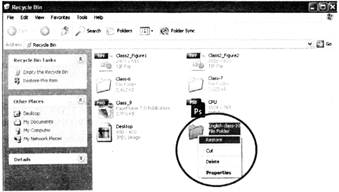
 For this, perform the following steps:

 Unknowingly you have deleted a file. Now you want to restore it. Which of the following steps you will follow to restore it?
(A) Double click Recycle Bin  select the file click File menu select Restore
(B) Double click file select Restore
(C) Click My computer Select the file Select Restore
(D) Click Recycle bin select the file select the Restore
(E) None of these
Answer: (A)
Explanation
Correct Option:
(A) Steps given in option (A) is correct. Therefore, option (A) is correct.
Incorrect Options: (B) Steps given in option (B) are incorrect. Therefore, option (B) is incorrect.
(C) Steps given in option (C) are incorrect. Therefore, option (C) is incorrect.
(D) Steps given in option (D) are incorrect. Therefore, option (D) is incorrect.
(E) Option (E) is incorrect.
 Fill in the blanks:
1. Easily restores data lost after accidental deletion, disk formats, boot sector failure, partition error with advanced _____ methods.
2. _______ software provides you smoother and faster way to create the EXE file installation setup package for windows application.
3. You can easily______ files and folders deleted from hard disk.
(A) Recover, data recovery, setup installer
(B) Setup installer, data recovery, recover
(C) Data recovery, setup installer, recover
(D) Technological, data recovery, restore
(E) None of these
Answer: (C)
Explanation
Correct Option:
(C) Options given in (C) are correct. Therefore, option (C) is correct.
Incorrect Options:
(A) Options given in (A) are incorrect. Therefore, option (A) is incorrect
(B) Options given in (B) are incorrect. Therefore, option (B) is incorrect
(D) Options given in (D) are incorrect. Therefore, option (D) is incorrect
(E) Option (E) is incorrect.
You need to login to perform this action.
You will be redirected in
3 sec