
 Using Computers in Hospitals
Health services and the art of medicine have been changed completely by the computers in recent times. It has brought many changes in the field of health and medicine.
Using Computers in Hospitals
Health services and the art of medicine have been changed completely by the computers in recent times. It has brought many changes in the field of health and medicine.
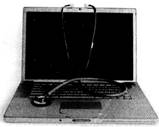
 In hospitals computer is used for the following:

 How does computer help a doctor to treat the patients?
(A) Computer keeps the record of the patient.
(B) With the help of computer doctors examine the internal organ of a patient.
(C) Both (A) and (B)
(D) None of these
Answer: (C)
Explanation
Correct Option:
(C) Computers help the doctor to keep the record of the patient and store patient data. Computers also help in examining the internal organ of a patient.
Incorrect Options:
(A) Not only Option (A) is correct but option (B) is also correct.
(B) Not only Option (B) is correct but option (A) is also correct.
In hospital CAT scan is very useful. What does CAT stand for?
(A) Cathode Applied Tube
(B) Computer Automatic Test
(C) Computerized Axial Tomography
(D) Computerized Axial Topography
Answer: (c)
Explanation
Correct Option:
(C) CAT scan stands for Computerized Axial Tomography scan and it is very useful for diagnose.
Incorrect Options:
(A) Incorrect full form.
(B) Incorrect full form.
(D) Incorrect full form.
How does computer help a doctor to treat the patients?
(A) Computer keeps the record of the patient.
(B) With the help of computer doctors examine the internal organ of a patient.
(C) Both (A) and (B)
(D) None of these
Answer: (C)
Explanation
Correct Option:
(C) Computers help the doctor to keep the record of the patient and store patient data. Computers also help in examining the internal organ of a patient.
Incorrect Options:
(A) Not only Option (A) is correct but option (B) is also correct.
(B) Not only Option (B) is correct but option (A) is also correct.
In hospital CAT scan is very useful. What does CAT stand for?
(A) Cathode Applied Tube
(B) Computer Automatic Test
(C) Computerized Axial Tomography
(D) Computerized Axial Topography
Answer: (c)
Explanation
Correct Option:
(C) CAT scan stands for Computerized Axial Tomography scan and it is very useful for diagnose.
Incorrect Options:
(A) Incorrect full form.
(B) Incorrect full form.
(D) Incorrect full form.  Using Computers in Education
Can you imagine a school without books or teachers? Well, that can be a reality by using computers. Now a day computer is used extensively in the field of education.
Using Computers in Education
Can you imagine a school without books or teachers? Well, that can be a reality by using computers. Now a day computer is used extensively in the field of education.
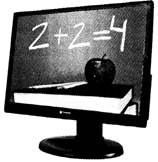 Computer helps in education in the following ways:

 Given below are few features of computer: Which of the following options is/are correct features of computer in schools?
1. Computer cannot be used as tutor.
2. Computer is used for keeping student details.
3. Computer is also used for checking examination papers.
(A) 2 and 3
(B) 1 and 3
(C) All of these
(D) None of these
Answer: (A)
Explanation
Correct Option:
(A) In education computers are used for many purposes such as keeping student details, checking examination papers, etc.
Incorrect Options:
(B) Feature 1 is incorrect but feature 3 is correct.
(C) All the given features are not correct.
(D) All the given features are not incorrect.
In education computers are used for ...........
1. Teaching students
2. Reserving seats for the students
3. Preparing results
4. All of these Which of the above statements is/are incorrect?
(A) 1 and 2
(B) Option 4
(C) Only 2
(D) 1 and 3
Answer: (c)
Correct Option:
(C) Now a day computers are used as a teacher. With the help of computer you can set a paper and prepare the results. Incorrect Options:
(A) Statement 1 is correct but statement 2 is incorrect.
(B) All the statements are not incorrect.
(D) Statement 1 and 3 are correct.
Given below are few features of computer: Which of the following options is/are correct features of computer in schools?
1. Computer cannot be used as tutor.
2. Computer is used for keeping student details.
3. Computer is also used for checking examination papers.
(A) 2 and 3
(B) 1 and 3
(C) All of these
(D) None of these
Answer: (A)
Explanation
Correct Option:
(A) In education computers are used for many purposes such as keeping student details, checking examination papers, etc.
Incorrect Options:
(B) Feature 1 is incorrect but feature 3 is correct.
(C) All the given features are not correct.
(D) All the given features are not incorrect.
In education computers are used for ...........
1. Teaching students
2. Reserving seats for the students
3. Preparing results
4. All of these Which of the above statements is/are incorrect?
(A) 1 and 2
(B) Option 4
(C) Only 2
(D) 1 and 3
Answer: (c)
Correct Option:
(C) Now a day computers are used as a teacher. With the help of computer you can set a paper and prepare the results. Incorrect Options:
(A) Statement 1 is correct but statement 2 is incorrect.
(B) All the statements are not incorrect.
(D) Statement 1 and 3 are correct.  Using Computers in Banks
Computer plays an important role in banks. It has helped to reduce the use of paper work and thus saves valuable time.
Using Computers in Banks
Computer plays an important role in banks. It has helped to reduce the use of paper work and thus saves valuable time.
 It helps in per forming the following task:

 Computers are used in Banks for ...............
(A) Ticket reservation
(B) Bill maintenance
(C) Maintain accounts of customer
(D) Both (A) and (B)
Answer: (C)
Explanation
Correct Option:
(C) Computer helps in maintaining the accounts of the customers.
Incorrect Options:
(A) Ticket reservation - in railways and airlines computers are used for ticketing.
(B) Bill maintenance - In shops, hospitals, etc computers are used for billing.
Which of the following statements is/are incorrect?
1. Bank issue only debit cards.
2. Bank do not issue monthly account statements.
3. Banks keep details of money deposited and withdrawn.
(A) 1 and 2
(B) 2 and 3
(C) Only 2
(D) All of these
Answer: (A)
Explanation
Correct Option:
(A) Banks issue debit cards as well as credit cards and also provide monthly statements.
Incorrect Options:
(B) Statement 2 is correct but statement 3 is incorrect.
(C) Only statement 2 is not correct but statement 1 is also correct.
(D) All the statements are not correct.
Computers are used in Banks for ...............
(A) Ticket reservation
(B) Bill maintenance
(C) Maintain accounts of customer
(D) Both (A) and (B)
Answer: (C)
Explanation
Correct Option:
(C) Computer helps in maintaining the accounts of the customers.
Incorrect Options:
(A) Ticket reservation - in railways and airlines computers are used for ticketing.
(B) Bill maintenance - In shops, hospitals, etc computers are used for billing.
Which of the following statements is/are incorrect?
1. Bank issue only debit cards.
2. Bank do not issue monthly account statements.
3. Banks keep details of money deposited and withdrawn.
(A) 1 and 2
(B) 2 and 3
(C) Only 2
(D) All of these
Answer: (A)
Explanation
Correct Option:
(A) Banks issue debit cards as well as credit cards and also provide monthly statements.
Incorrect Options:
(B) Statement 2 is correct but statement 3 is incorrect.
(C) Only statement 2 is not correct but statement 1 is also correct.
(D) All the statements are not correct.  Using Computers in Railways and Airlines
Computers are widely used in railways and airlines.
Using Computers in Railways and Airlines
Computers are widely used in railways and airlines.
 Computers are used to control the traffic and for the following purposes:


 Given below are the statements. Which one of the following options is correct for the following statements? In railway you use computer for controlling traffic and preparing time tables
1. In airlines computers are used for reserving the tickets
2. Airlines does not use computer for preparing time tables
3. Rail tickets are not booked by the computer.
(A) 1 and 2 are correct
(B) 3 and 4 are correct
(C) 2 and 3 are correct
(D) All of these are correct
Answer: (A)
Explanation
Correct Option:
(A) In railways and airlines computer are used for doing most of the works.
Incorrect Options:
(B) Statements 3 and 4 are incorrect.
(C) Statement 2 is correct but statement 3 is incorrect.
(D) All the statements are not correct.
Match the following agency with their respective users.
A B
1. Railways i. IATA
2. Airlines ii. IRCTC
iii. Flight Raja
(A) 1, iii; 2, ii, i
(B) i, ii; 2, i, iii
(C) 1,i;2,ii, iii
(D) 1, i, ii; 2, iii
Answer: (B)
Explanation
Correct Option:
(B) IATA (International Air Transport Association) and flight raja are used by Airlines. Railways use IRCTC which stands for Indian Railways Catering and Tourism Corporation.
Incorrect Options:
(A) Option (A) is matched incorrectly.
(C) Option (C) is matched incorrectly.
(D) Option (D) is matched incorrectly.
Given below are the statements. Which one of the following options is correct for the following statements? In railway you use computer for controlling traffic and preparing time tables
1. In airlines computers are used for reserving the tickets
2. Airlines does not use computer for preparing time tables
3. Rail tickets are not booked by the computer.
(A) 1 and 2 are correct
(B) 3 and 4 are correct
(C) 2 and 3 are correct
(D) All of these are correct
Answer: (A)
Explanation
Correct Option:
(A) In railways and airlines computer are used for doing most of the works.
Incorrect Options:
(B) Statements 3 and 4 are incorrect.
(C) Statement 2 is correct but statement 3 is incorrect.
(D) All the statements are not correct.
Match the following agency with their respective users.
A B
1. Railways i. IATA
2. Airlines ii. IRCTC
iii. Flight Raja
(A) 1, iii; 2, ii, i
(B) i, ii; 2, i, iii
(C) 1,i;2,ii, iii
(D) 1, i, ii; 2, iii
Answer: (B)
Explanation
Correct Option:
(B) IATA (International Air Transport Association) and flight raja are used by Airlines. Railways use IRCTC which stands for Indian Railways Catering and Tourism Corporation.
Incorrect Options:
(A) Option (A) is matched incorrectly.
(C) Option (C) is matched incorrectly.
(D) Option (D) is matched incorrectly.  Computers in our Daily Life
In the modern times, one can see a grandmother sitting in India talking face to face with her grandson in the US. This wonder could be achieved only through computers, via the Internet and the webcam. Distance is no longer a barrier and the world has become a smaller place and one can talk directly face to face from a person sitting anywhere in the world. Today we can see different types of computers working in every field of life. At home we use PCs (Personal Computers) or the Home Computer. Busy officials on the move can often be seen working on their small and handy laptops, which is a Notebook Computer. In your school computer lab, you can find a group of computers connected together, which is called LAN (Local Area Network). Some important companies manufacturing computers are Apple Computers and IBM. IBM PC is very popular. The computer has become such an important part of our lives that we can find it almost everywhere. Some of the important applications of computers are as follows:
Computers in our Daily Life
In the modern times, one can see a grandmother sitting in India talking face to face with her grandson in the US. This wonder could be achieved only through computers, via the Internet and the webcam. Distance is no longer a barrier and the world has become a smaller place and one can talk directly face to face from a person sitting anywhere in the world. Today we can see different types of computers working in every field of life. At home we use PCs (Personal Computers) or the Home Computer. Busy officials on the move can often be seen working on their small and handy laptops, which is a Notebook Computer. In your school computer lab, you can find a group of computers connected together, which is called LAN (Local Area Network). Some important companies manufacturing computers are Apple Computers and IBM. IBM PC is very popular. The computer has become such an important part of our lives that we can find it almost everywhere. Some of the important applications of computers are as follows:
 The Windows Operating System
Just try to imagine the situation in the class where a teacher gives assignments and checks the activities of the students. In the class one teacher manages all the students similarly inside the computer too; there is one program that manages all the other programs, just like a teacher. This program is called Windows. In order to start and work, every computer needs an operating system. An operating system acts like an interpreter between the computer hardware and the user. An interpreter is required because the computer and human beings speak different languages. There are many operating systems in the market such as Mac OS X and UNIX but Windows is the most popular operating system that controls the working of the computer. Windows keeps everything in order. It knows which file to open from which directory, how much memory to be given to a program and so on. Windows can come in different versions (such as Windows 7, Windows 2000, and Window Vista).
The Windows Operating System
Just try to imagine the situation in the class where a teacher gives assignments and checks the activities of the students. In the class one teacher manages all the students similarly inside the computer too; there is one program that manages all the other programs, just like a teacher. This program is called Windows. In order to start and work, every computer needs an operating system. An operating system acts like an interpreter between the computer hardware and the user. An interpreter is required because the computer and human beings speak different languages. There are many operating systems in the market such as Mac OS X and UNIX but Windows is the most popular operating system that controls the working of the computer. Windows keeps everything in order. It knows which file to open from which directory, how much memory to be given to a program and so on. Windows can come in different versions (such as Windows 7, Windows 2000, and Window Vista).
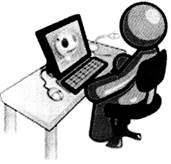
 Shutting Down Windows
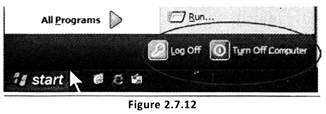
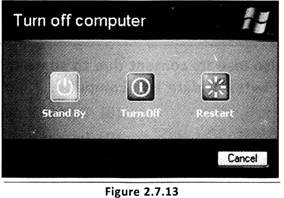
After finishing your work on the computer, you need to Exit from the applications you are working on, save your work and then shut down Windows. By saving your work, you make sure that you do not have to keep starting the same thing over and over again. When you are ready to continue working, you just need to open the saved file. If you click Turn Off Computer option on the Start menu you will see a dialogue box like that shown in the figure below with some options.
Shutting Down Windows
After finishing your work on the computer, you need to Exit from the applications you are working on, save your work and then shut down Windows. By saving your work, you make sure that you do not have to keep starting the same thing over and over again. When you are ready to continue working, you just need to open the saved file. If you click Turn Off Computer option on the Start menu you will see a dialogue box like that shown in the figure below with some options.
 Click Turn Off option. This will turn off your PC.
 Note: Sometimes viruses may cause errors in your program and cause the computer to shut down automatically without any action from your side. In that case you will need to scan your computer system with Antivirus software which will clean up the system.

 Windows is the most popular user-friendly operating system. It is a _________ operating system.
(A) CUI
(B) SUI
(C) MUI
(D) GUI
Answer: (D)
Explanation
Correct Option:
(D) Windows is a GUI (Graphical User Interface) operating system.
Incorrect Options:
(A) Option (A) is incorrect.
(B) Option (B) is incorrect.
(C) Option (C) is incorrect.
Computer can also lose its content due to something. Which thing may spoil millions of bytes of data in a computer, if not detected?
(A) Virus
(B) Bacteria
(C) Fever
(D) Insect
Answer: (A)
Explanation
Correct Option:
(A) In a computer virus may spoil millions of bytes of data.
Incorrect Options:
(B) Option (B) is incorrect.
(C) Option (C) is incorrect.
(D) Option (D) is incorrect.
Windows is the most popular user-friendly operating system. It is a _________ operating system.
(A) CUI
(B) SUI
(C) MUI
(D) GUI
Answer: (D)
Explanation
Correct Option:
(D) Windows is a GUI (Graphical User Interface) operating system.
Incorrect Options:
(A) Option (A) is incorrect.
(B) Option (B) is incorrect.
(C) Option (C) is incorrect.
Computer can also lose its content due to something. Which thing may spoil millions of bytes of data in a computer, if not detected?
(A) Virus
(B) Bacteria
(C) Fever
(D) Insect
Answer: (A)
Explanation
Correct Option:
(A) In a computer virus may spoil millions of bytes of data.
Incorrect Options:
(B) Option (B) is incorrect.
(C) Option (C) is incorrect.
(D) Option (D) is incorrect.


 Clicking and Double Clicking
As you know that mouse has two buttons: left and right. You use the mouse by pressing its buttons. Pressing the button is called clicking. While pointing at an item using the mouse, you must always place the tip of the pointer over the item, but not on its body. You can select an item on the screen by pressing and releasing the mouse button, which is known as Clicking. You double click the mouse to open an item. Quickly pressing and releasing the left mouse button twice is called Double Clicking. (See Figure 2.7.8)
Clicking and Double Clicking
As you know that mouse has two buttons: left and right. You use the mouse by pressing its buttons. Pressing the button is called clicking. While pointing at an item using the mouse, you must always place the tip of the pointer over the item, but not on its body. You can select an item on the screen by pressing and releasing the mouse button, which is known as Clicking. You double click the mouse to open an item. Quickly pressing and releasing the left mouse button twice is called Double Clicking. (See Figure 2.7.8)
 To activate the program/file/ folder that an icon represents, you simply double click (two clicks in quick succession) on it with the left mouse button. This will activate the icon and either start a program or open a file/folder. Files and folders are places where information is stored in a computer, just as you would store important papers in an office or home. Let us look at two of the icons on the desktop- My Documents and the Recycle Bin icon. Try double-clicking it and see what happens. (See Figure 2.7.9)
 Recycle Bin
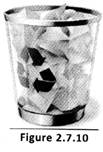
The Trash can you use at home is to throw rubbish and unwanted things. Similarly when you delete an unwanted file. Windows will place the file into the recycle bin (instead of deleting it altogether). This allows you to Restore (bring back) the file in case you deleted it by mistake. For example, if you deleted a file by accident you could double dick on the recycle bin icon to see its contents. Inside you will see the file/folder that you deleted, to restore the file back to where you deleted it from, right click it and then select Restore from the menu that appears.
Recycle Bin
The Trash can you use at home is to throw rubbish and unwanted things. Similarly when you delete an unwanted file. Windows will place the file into the recycle bin (instead of deleting it altogether). This allows you to Restore (bring back) the file in case you deleted it by mistake. For example, if you deleted a file by accident you could double dick on the recycle bin icon to see its contents. Inside you will see the file/folder that you deleted, to restore the file back to where you deleted it from, right click it and then select Restore from the menu that appears.
 My Documents
 is the name of a special folder on the computer's hard drive that the system commonly uses to store a user's documents, pictures, music, downloads and many other files.
My Documents
My Documents is the name of a special folder on the computer's hard drive that the system commonly uses to store a user's documents, pictures, music, downloads and many other files.


 Identify the correct statements about mouse.
1. Quickly pressing and releasing the left mouse button twice is called Double Clicking.
2. Pressing the button is called clicking.
3. Pressing right button twice and left button once is called triple clicking.
(A) 1 and 3
(B) 1 and 2
(C) All of these
(D) None of these
Answer: (B)
Explanation
Correct Option:
(B) Statement 1 and 2 are correct.
Incorrect Options:
(A) Statement 1 is correct but statement more...
Identify the correct statements about mouse.
1. Quickly pressing and releasing the left mouse button twice is called Double Clicking.
2. Pressing the button is called clicking.
3. Pressing right button twice and left button once is called triple clicking.
(A) 1 and 3
(B) 1 and 2
(C) All of these
(D) None of these
Answer: (B)
Explanation
Correct Option:
(B) Statement 1 and 2 are correct.
Incorrect Options:
(A) Statement 1 is correct but statement more... 

 On Desktop you have seen one mbar is there. On the bar many opened files are present. In windows 'Start' button is located on that bar. Name the bar.
(A) Task bar
(B) Menu bar
(C) Title bar
(D) None of these
Answer: (a)
Explanation
Correct Option:
(A) Task bar: Start button is located on this bar.
Incorrect Options:
(B) Menu bar: Is present in the document.
(C) Title bar: Is present in the document.
The start menu is used
i. to access program
ii. to access settings
iii. to access printer Which of these are correct?
(A) Only (i)
(B) (ii) and (iii)
(C) All of these
(D) None of these
Answer: (c)
Explanation
Correct Option:
(C) The start menu is used to access programs, settings, printer more.
Incorrect Options:
(A) Option (A) is incorrect.
(B) Option (B) is incorrect.
(D) Option (D) is incorrect.
On Desktop you have seen one mbar is there. On the bar many opened files are present. In windows 'Start' button is located on that bar. Name the bar.
(A) Task bar
(B) Menu bar
(C) Title bar
(D) None of these
Answer: (a)
Explanation
Correct Option:
(A) Task bar: Start button is located on this bar.
Incorrect Options:
(B) Menu bar: Is present in the document.
(C) Title bar: Is present in the document.
The start menu is used
i. to access program
ii. to access settings
iii. to access printer Which of these are correct?
(A) Only (i)
(B) (ii) and (iii)
(C) All of these
(D) None of these
Answer: (c)
Explanation
Correct Option:
(C) The start menu is used to access programs, settings, printer more.
Incorrect Options:
(A) Option (A) is incorrect.
(B) Option (B) is incorrect.
(D) Option (D) is incorrect.  Purpose of Taskbar
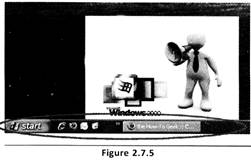
The Taskbar is a bar at the bottom of the screen. It is another important part of the Windows operating system. One of its main uses is to switch between any open programs or documents. It simply means that while writing a letter you can draw a picture, listen to, music and then come back to your letter again without closing any program (See Figure 2.7.5)
Purpose of Taskbar
The Taskbar is a bar at the bottom of the screen. It is another important part of the Windows operating system. One of its main uses is to switch between any open programs or documents. It simply means that while writing a letter you can draw a picture, listen to, music and then come back to your letter again without closing any program (See Figure 2.7.5)
 The Clock
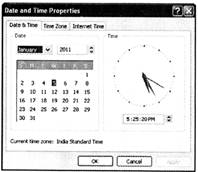
On the right side of the Taskbar, you will find the clock which shows the time that has been set at your computer. You can set the clock yourself and can change the time. (See Figure 2.7.6)
The Clock
On the right side of the Taskbar, you will find the clock which shows the time that has been set at your computer. You can set the clock yourself and can change the time. (See Figure 2.7.6)

 Which of the following statements is/ are correct? i. Task bar is the bottom bar of a Desktop. ii. Task bar helps to switch between any open documents.
(A) Only (i)
(B) Only (ii)
(C) Both are correct
(D) Both are incorrect
Answer: (c)
Explanation
Correct Option:
(C) Both of the statements are correct. Task bar is the bottom bar and its helps in switching between the opened documents.
Incorrect Options:
(A) Option (A) is incorrect.
(B) Option (B) is incorrect.
(D) Option (D) is incorrect.
Where does Taskbar locate on windows Desktop by default?
(A) Bottom
(B) Top
(C) Left
(D) Right
Answer: (a)
Explanation
Correct Option:
(A) By default Taskbar locate on the bottom of a window.
Incorrect Options:
(B) Option (B) is incorrect.
(C) Option (C) is incorrect.
(D) Option (D) is incorrect.
Which of the following statements is/ are correct? i. Task bar is the bottom bar of a Desktop. ii. Task bar helps to switch between any open documents.
(A) Only (i)
(B) Only (ii)
(C) Both are correct
(D) Both are incorrect
Answer: (c)
Explanation
Correct Option:
(C) Both of the statements are correct. Task bar is the bottom bar and its helps in switching between the opened documents.
Incorrect Options:
(A) Option (A) is incorrect.
(B) Option (B) is incorrect.
(D) Option (D) is incorrect.
Where does Taskbar locate on windows Desktop by default?
(A) Bottom
(B) Top
(C) Left
(D) Right
Answer: (a)
Explanation
Correct Option:
(A) By default Taskbar locate on the bottom of a window.
Incorrect Options:
(B) Option (B) is incorrect.
(C) Option (C) is incorrect.
(D) Option (D) is incorrect. 

You need to login to perform this action.
You will be redirected in
3 sec