
 More on Desktop
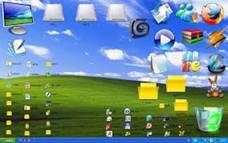
You are already familiar with the Desktop. This is first screen appears as soon as windows gets started. (See Figure 5.3.4)
More on Desktop
You are already familiar with the Desktop. This is first screen appears as soon as windows gets started. (See Figure 5.3.4)
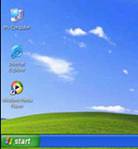
 There are many icons on the Desktop which point to a program, folder and document or Internet location. My Computer lists the contents of the computer. Double click on My Computer icon on the Desktop. It displays the various drives in your computer such as the Floppy disk drive, Hard disk drive and CD drive. (See Figure 5.3.5)
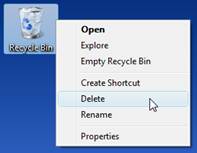
 If you double-click on any one of the icons, you get further information about what it stands for. For example, if there is a floppy in the drive, a double-click on the corresponding icon will give you the list of files that the floppy contains. The Recycle Bin is an icon on the Desktop which temporarily holds deleted items or files that you no longer need. If the wastebasket Bin is empty then its icon, the wastebasket, looks empty. If it is not empty, double click on it and the contents will be displayed. (See Figure 5.3.6)
 In the list of deleted files, you may find an item that was deleted by mistake. In that case, drag the item out of the Recycle Bin onto the Desktop and click the Close button. Or, Click on the File menu and choose Restore.
 When there are too many items in the Recycle Bin and you do not need any of them, you can permanently delete the files by performing the following steps:

 When you double click on the My Documents icon, it displays:
(A) Deleted files present in the computer
(B) All the computers attached with the network
(C) Drives available in the computer
(D) Documents present in the computer
(E) None of these
Answer :(D)
Correct Option:
(D) Documents present in the computer: Double-clicking the My Documents icon displays the different documents present in the computer.
Incorrect Options:
(A) Deleted files present in the computer: Recycle Bin icon displays the list of deleted files on a computer.
(B) All the computers attached with the network: Network Neighborhood icon displays all the computers attached with the network.
(C) Drives available in the computer: My Computer icon displays the different drives in the more...
When you double click on the My Documents icon, it displays:
(A) Deleted files present in the computer
(B) All the computers attached with the network
(C) Drives available in the computer
(D) Documents present in the computer
(E) None of these
Answer :(D)
Correct Option:
(D) Documents present in the computer: Double-clicking the My Documents icon displays the different documents present in the computer.
Incorrect Options:
(A) Deleted files present in the computer: Recycle Bin icon displays the list of deleted files on a computer.
(B) All the computers attached with the network: Network Neighborhood icon displays all the computers attached with the network.
(C) Drives available in the computer: My Computer icon displays the different drives in the more...  Windows
Applications Windows programs are software applications that are run on a computer that is also running Microsoft Windows as an operating system. A software application or program is a set of logical conditions grouped together to perform some function. Typically a Microsoft Windows application will be run within a "window" although that is not a requirement. A "window" in the context of software is an area of the screen set aside to run a single program and may or may not have options for controlling the position and size of the program area. (See Figure 5.3.2)
Windows
Applications Windows programs are software applications that are run on a computer that is also running Microsoft Windows as an operating system. A software application or program is a set of logical conditions grouped together to perform some function. Typically a Microsoft Windows application will be run within a "window" although that is not a requirement. A "window" in the context of software is an area of the screen set aside to run a single program and may or may not have options for controlling the position and size of the program area. (See Figure 5.3.2)
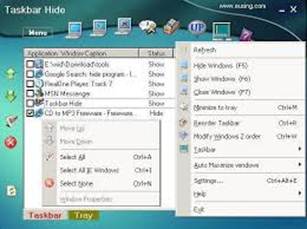
 Some examples of Microsoft Windows applications are:
You can Open These Applications that come With Windows by following these routes:
Start ->Program-> Accessories-> Calculator
Start -> Program -> Accessories -> Paint
Windows: Utilities
Utilities are programs that extend the services of the operating system. It can either be part of the operating system or it can be software that is downloaded as an add-on. Microsoft includes some Windows Utilities with their operating systems. Several versions of Microsoft Windows are packaged with system tools. By clicking the Start button, selecting Programs then Accessories, you will find the menu option for system tools. In Windows 2000, the Backup utility allows the user to schedule backup on an included calendar. Backup of System state, selected files, drives and network data or the entire computer are options provided as well as a Restore menu. In addition, a utility in the backup category enables the user to create an emergency repair disk while another generates backup reports. Other Windows Utilities available from System Tools are Disk Cleanup and Disk Defrag. The Disk Cleanup utility scans the hard drive and indicates how much hard drive space could be saved by deleting unnecessary files, such as temp files and downloaded program files. Disk Defrag gathers data fragments and places them contiguously, recovering disk space and speeding up processes. An invaluable utility is Task Manager, which shows system usage. Security software is considered a Windows utility, as it often monitors the registry, which is the core of any operating system. Effective antivirus software will monitor registry changes and alert the user to accept or reject the change requested. (See Figure 5.3.3)
Some examples of Microsoft Windows applications are:
You can Open These Applications that come With Windows by following these routes:
Start ->Program-> Accessories-> Calculator
Start -> Program -> Accessories -> Paint
Windows: Utilities
Utilities are programs that extend the services of the operating system. It can either be part of the operating system or it can be software that is downloaded as an add-on. Microsoft includes some Windows Utilities with their operating systems. Several versions of Microsoft Windows are packaged with system tools. By clicking the Start button, selecting Programs then Accessories, you will find the menu option for system tools. In Windows 2000, the Backup utility allows the user to schedule backup on an included calendar. Backup of System state, selected files, drives and network data or the entire computer are options provided as well as a Restore menu. In addition, a utility in the backup category enables the user to create an emergency repair disk while another generates backup reports. Other Windows Utilities available from System Tools are Disk Cleanup and Disk Defrag. The Disk Cleanup utility scans the hard drive and indicates how much hard drive space could be saved by deleting unnecessary files, such as temp files and downloaded program files. Disk Defrag gathers data fragments and places them contiguously, recovering disk space and speeding up processes. An invaluable utility is Task Manager, which shows system usage. Security software is considered a Windows utility, as it often monitors the registry, which is the core of any operating system. Effective antivirus software will monitor registry changes and alert the user to accept or reject the change requested. (See Figure 5.3.3)

 Using Windows Accessories, which of the following is/are the most appropriate utility for making drawings?
(A) WordPad
(B) Paint
(C) MS Excel
(D) Notepad
(E) None of these
Answer: (b)
Explanation
Correct option:
(B) Paint:Paint is an example of an application program which is used for drawing.
Incorrect Options:
(A) Word more...
Using Windows Accessories, which of the following is/are the most appropriate utility for making drawings?
(A) WordPad
(B) Paint
(C) MS Excel
(D) Notepad
(E) None of these
Answer: (b)
Explanation
Correct option:
(B) Paint:Paint is an example of an application program which is used for drawing.
Incorrect Options:
(A) Word more...  System Programs and Application Programs
There are basically two types of programs that we use: system programs and application programs. The system programs constitute what we call an operating system.
System Programs and Application Programs
There are basically two types of programs that we use: system programs and application programs. The system programs constitute what we call an operating system.
 The programs that make up the operating system are:

 System programs have many uses. Some are given below. Select the correct one.
1. They manage hardware and memory resources of the computer.
2. They help to copy, rename and delete files.
3. They help in word processing and painting.
(A) Only 2
(B) 1 and 2
(C) 1 and 3
(D) 2 and 3
(E) None of these
Answer: (B)
Explanation
Correct option:
(B) Only statements 1 and 2 are correct.
Incorrect Options:
(A) Statement 1 is correct but statement 2 is also correct. Therefore, option (A) is incorrect.
(C) Statement 1 is correct but statement 3 is incorrect. Therefore, option (C) is incorrect.
(D) Statement 3 is incorrect whereas statement 2 is correct. Therefore, option (D) is incorrect.
(E) All the given statements are not incorrect. Therefore, option (E) is incorrect.
Notepad is an example of________
(A) Control programs
(B) Supervisory programs
(C) Application Programs
(D) Service programs
(E) None of these
Answer: (c)
Explanation
Correct option:
(C) Application Program: Notepad is an example of an application program which is used for typing text.
Incorrect Options:
(A) Control programs: This option is incorrect
(B) Supervisory programs: This option is incorrect
(D) Service programs: This option is incorrect
(E) None of these: This option is invalid
System programs have many uses. Some are given below. Select the correct one.
1. They manage hardware and memory resources of the computer.
2. They help to copy, rename and delete files.
3. They help in word processing and painting.
(A) Only 2
(B) 1 and 2
(C) 1 and 3
(D) 2 and 3
(E) None of these
Answer: (B)
Explanation
Correct option:
(B) Only statements 1 and 2 are correct.
Incorrect Options:
(A) Statement 1 is correct but statement 2 is also correct. Therefore, option (A) is incorrect.
(C) Statement 1 is correct but statement 3 is incorrect. Therefore, option (C) is incorrect.
(D) Statement 3 is incorrect whereas statement 2 is correct. Therefore, option (D) is incorrect.
(E) All the given statements are not incorrect. Therefore, option (E) is incorrect.
Notepad is an example of________
(A) Control programs
(B) Supervisory programs
(C) Application Programs
(D) Service programs
(E) None of these
Answer: (c)
Explanation
Correct option:
(C) Application Program: Notepad is an example of an application program which is used for typing text.
Incorrect Options:
(A) Control programs: This option is incorrect
(B) Supervisory programs: This option is incorrect
(D) Service programs: This option is incorrect
(E) None of these: This option is invalid  Introduction
You have learned about Windows, which is the most popular operating system (OS) that makes a computer work. You saw that all the processing work that goes on inside the computer is controlled by the central processing unit or CPU. The CPU follows a list of instructions stored in the computer's memory.-This list of instructions is called program. When the CPU is processing or working on an instruction, the mouse pointer changes into an hourglass figure. When the CPU is working and obeying a sequence of instructions, we say that it is executing a program or software. (See Figure 5.3.1)
Introduction
You have learned about Windows, which is the most popular operating system (OS) that makes a computer work. You saw that all the processing work that goes on inside the computer is controlled by the central processing unit or CPU. The CPU follows a list of instructions stored in the computer's memory.-This list of instructions is called program. When the CPU is processing or working on an instruction, the mouse pointer changes into an hourglass figure. When the CPU is working and obeying a sequence of instructions, we say that it is executing a program or software. (See Figure 5.3.1)

 Introduction to Logo
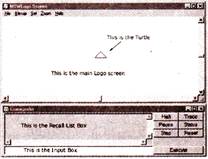
Now we will get acquainted with the LOGO interface. LOGO Screen is divided into Two Parts:
1. Graphic Area: The upper part of the screen where the turtle moves and draws figures is called Graphic Area.
2. Text Area: The lower part of the screen where we give different commands is the text area. This is called the Commander or the Listener. (See Figure 5.2.1)
Introduction to Logo
Now we will get acquainted with the LOGO interface. LOGO Screen is divided into Two Parts:
1. Graphic Area: The upper part of the screen where the turtle moves and draws figures is called Graphic Area.
2. Text Area: The lower part of the screen where we give different commands is the text area. This is called the Commander or the Listener. (See Figure 5.2.1)

 Turtle
A small triangle that appears in the center of the screen is called Turtle. It is used to make figures on the screen and leaves a trail behind as it works. The pointed end of the turtle is called its head. The wide end of the turtle is called its tail. Whenever you start LOGO, the turtle will appear in the center. The center of the screen is called the Home of the turtle. (See Figure 5.2.2)
Turtle
A small triangle that appears in the center of the screen is called Turtle. It is used to make figures on the screen and leaves a trail behind as it works. The pointed end of the turtle is called its head. The wide end of the turtle is called its tail. Whenever you start LOGO, the turtle will appear in the center. The center of the screen is called the Home of the turtle. (See Figure 5.2.2)
 Prompt
The question mark (?) on the lower part of the screen where we give commands is called prompt.
Primitives
The instructions you give to the turtle are called Commands or Primitives. Some of the primitives are FD, BK, RT, LT, HOME etc.
Prompt
The question mark (?) on the lower part of the screen where we give commands is called prompt.
Primitives
The instructions you give to the turtle are called Commands or Primitives. Some of the primitives are FD, BK, RT, LT, HOME etc.  Common Analogies
 Profession
Under this type of questions, two words are given. These words are related to each other in terms of profession. The student is required to find out the relation between the first two words and choose the word from the given alternatives.
1. Director : Film :: Editor : Newspaper
2. Warrior : Battle field :: Novelist : Novel
3. Engineer : Bridges :: Architect : Design
4. Sailor : Ship :: Pilot : Plane
5. Librarian : Library :: Cashier : Bank
6. Army : Land :: Cost Guard : Sea
Dwelling Place
Under this type of questions, two words are given. These words are related to each other as the animals and their dwelling places. See the following examples:
Ant Hill or Formicary
Badger Sett
Bat Roost,
Cave Bear Den
Beaver Lodge
Bee Hive
Bird Nest
Bird of Prey Eyrie
Cat Cattery, Lair, Den
Cattle Barn, Byre, Pasture, Stable
Chicken Coop, Ru
Dog Kennel
Fox Earth, Den, Hole, Lair
Hare Form
Horse Paddock, Stable, Stall, Stud
Lion Den
Mole Burrow, Fortress, Tunnel
Otter Holt, Ledge
Pig Pen, Sty
Rabblt Warren, Burrow, Cony-garth, Hutch
sheep Fold, Pen
Snake Nest
Spider Web
Squirrel Drey
Termite Mound
Tiger Lair
Wasp Nest, Vespiary
wolf Lair, Den
Relation
Under this type of questions, two words are given. These words are related to each other in relation. The student is required to find out the relation between the first two words and choose the words from the alternatives given that bear the same relationship.
1. Hand: Palm :: Foot: Sole.
2. Human: Development:: Universe: Expansion
3. Mammals : Young ones more...
Profession
Under this type of questions, two words are given. These words are related to each other in terms of profession. The student is required to find out the relation between the first two words and choose the word from the given alternatives.
1. Director : Film :: Editor : Newspaper
2. Warrior : Battle field :: Novelist : Novel
3. Engineer : Bridges :: Architect : Design
4. Sailor : Ship :: Pilot : Plane
5. Librarian : Library :: Cashier : Bank
6. Army : Land :: Cost Guard : Sea
Dwelling Place
Under this type of questions, two words are given. These words are related to each other as the animals and their dwelling places. See the following examples:
Ant Hill or Formicary
Badger Sett
Bat Roost,
Cave Bear Den
Beaver Lodge
Bee Hive
Bird Nest
Bird of Prey Eyrie
Cat Cattery, Lair, Den
Cattle Barn, Byre, Pasture, Stable
Chicken Coop, Ru
Dog Kennel
Fox Earth, Den, Hole, Lair
Hare Form
Horse Paddock, Stable, Stall, Stud
Lion Den
Mole Burrow, Fortress, Tunnel
Otter Holt, Ledge
Pig Pen, Sty
Rabblt Warren, Burrow, Cony-garth, Hutch
sheep Fold, Pen
Snake Nest
Spider Web
Squirrel Drey
Termite Mound
Tiger Lair
Wasp Nest, Vespiary
wolf Lair, Den
Relation
Under this type of questions, two words are given. These words are related to each other in relation. The student is required to find out the relation between the first two words and choose the words from the alternatives given that bear the same relationship.
1. Hand: Palm :: Foot: Sole.
2. Human: Development:: Universe: Expansion
3. Mammals : Young ones more...  Exiting From LOGO
We can exit LOGO in two ways:
Exiting From LOGO
We can exit LOGO in two ways:
 One is by giving bye command at LOGO prompt.
? BYE
OR
Click Exit from the File menu.
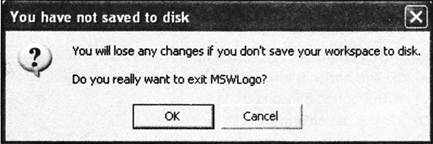
In both the ways, LOGO will display a message window for your confirmation. Insert screen shot of Exit message window of logo
Click Yes to exit from LOGO or Click No to remain in the LOGO window.
One is by giving bye command at LOGO prompt.
? BYE
OR
Click Exit from the File menu.
In both the ways, LOGO will display a message window for your confirmation. Insert screen shot of Exit message window of logo
Click Yes to exit from LOGO or Click No to remain in the LOGO window.

 Which of the following commands is/are used to exit from Logo?
(A) Close
(B) End
(C) Bye
(D) Clear
(E) None of these
Answer: (c)
Explanation
Correct option:
(C) Bye : Bye command is used to end the LOGO session.
Incorrect Options:
(A) Close: This option is incorrect
(B) End: This option is incorrect
(D) Clear: This option is incorrect
(E) None of these: This option is invalid
Which of the following results will be obtained by typing the given LOGO command at the prompt?
? Print 9-3
(A) 12
(B) 6
(C) 3
(D) 27
(E) None of these
Answer: (b)
Explanation
Correct option:
(B) 6 : The result of the command? Print 9-3 is 6 after subtraction.
Incorrect Options:
(A) 12: This option is incorrect
(C) 3 : This option is incorrect
(D) 27: This option is incorrect
(E) None of these: This is an invalid option
Which of the following commands is/are used to exit from Logo?
(A) Close
(B) End
(C) Bye
(D) Clear
(E) None of these
Answer: (c)
Explanation
Correct option:
(C) Bye : Bye command is used to end the LOGO session.
Incorrect Options:
(A) Close: This option is incorrect
(B) End: This option is incorrect
(D) Clear: This option is incorrect
(E) None of these: This option is invalid
Which of the following results will be obtained by typing the given LOGO command at the prompt?
? Print 9-3
(A) 12
(B) 6
(C) 3
(D) 27
(E) None of these
Answer: (b)
Explanation
Correct option:
(B) 6 : The result of the command? Print 9-3 is 6 after subtraction.
Incorrect Options:
(A) 12: This option is incorrect
(C) 3 : This option is incorrect
(D) 27: This option is incorrect
(E) None of these: This is an invalid option


 Abbreviations
LOGO - Logic Oriented Graphic Oriented
Abbreviations
LOGO - Logic Oriented Graphic Oriented  Calculations in Logo
Logo can work as a calculator also. You can do simple calculations like Addition, Subtraction, Multiplication and Division in Logo by using the Print command. All the calculations can be done at the LOGO Prompt only in the Text Window.
Calculations in Logo
Logo can work as a calculator also. You can do simple calculations like Addition, Subtraction, Multiplication and Division in Logo by using the Print command. All the calculations can be done at the LOGO Prompt only in the Text Window.
 The symbols used in the computer are:
Arithmetic Operation SYMBOL
Addition +
Subtraction -
Multiplication *
Division /
For example:
? Print 2+5 (Press the Enter key)
7 will be displayed as the sum of both the numbers.
Other examples are:
? Print 8-3
? Print 2*3
? Print 10/2
The symbols used in the computer are:
Arithmetic Operation SYMBOL
Addition +
Subtraction -
Multiplication *
Division /
For example:
? Print 2+5 (Press the Enter key)
7 will be displayed as the sum of both the numbers.
Other examples are:
? Print 8-3
? Print 2*3
? Print 10/2

 Introduction
Analogy 'means 'correspondence'. In questions based on analogy, a particular relationship is given and another similar relationship has to be identified from the alternatives provided. Analogy tests are therefore meant to test the candidate's overall vocabulary, power of reasoning and ability to think concisely and accurately. Below given are some examples of analogy based on common relationship, along with their explanations. Observe them carefully as these will help you to understand the concept of analogy in a better way.
Introduction
Analogy 'means 'correspondence'. In questions based on analogy, a particular relationship is given and another similar relationship has to be identified from the alternatives provided. Analogy tests are therefore meant to test the candidate's overall vocabulary, power of reasoning and ability to think concisely and accurately. Below given are some examples of analogy based on common relationship, along with their explanations. Observe them carefully as these will help you to understand the concept of analogy in a better way.

 Boat : Ship ::
(A) Book: volume
(B) Oar: water
(C) Raft : stern
(D) Land : sea
(E) None of these
Answer: (A)
Explanation:
A ship is more than just an ordinary boat. A volume is more than just an ordinary book.
Role : Actor ::
(A) Position : ball player
(B) Private : soldier
(C) Melody : singer
(D) Character : part
(E) None of these
Answer: (A)
Explanation:
An actor plays a role. A ball-player plays in a position.
Bright : Brilliant ::
(A) Happy : ecstatic
(B) Light : fire
(C) Colour : red
(D) Window : light
(E) None of these
Answer: (A)
Explanation:
A person who is excessively bright is brilliant. A person who is excessively happy is ecstatic.
Prow : Ship ::
(A) Nose : aeroplane
(B) Bird : beak
(C) Wheel : car
(D) Point : shaft
(E) None of these
Answer: (A)
Explanation:
The prow is the forward part of a ship. The nose is the forward part of the airplane.
Hair : Horse ::
(A) Wool : sheep
(B) Feather : bird
(C) Fur : animal
(D) Down : pillow
(E) None of these
Answer: (A)
Explanation:
A horse is a four-legged animal that is covered with hair. A sheep is a four-legged animal that is covered with wool.
Whale : Fish ::
(A) Fly : insect
(B) Bat : bird
(C) Clue : detective
(D) Mako : shark
(E) None of these
Answer: (B)
Explanation:
A whale is a mammal that is mistakenly thought to be a fish. A bat is a mammal that is mistakenly thought to be a bird.
Boat : Ship ::
(A) Book: volume
(B) Oar: water
(C) Raft : stern
(D) Land : sea
(E) None of these
Answer: (A)
Explanation:
A ship is more than just an ordinary boat. A volume is more than just an ordinary book.
Role : Actor ::
(A) Position : ball player
(B) Private : soldier
(C) Melody : singer
(D) Character : part
(E) None of these
Answer: (A)
Explanation:
An actor plays a role. A ball-player plays in a position.
Bright : Brilliant ::
(A) Happy : ecstatic
(B) Light : fire
(C) Colour : red
(D) Window : light
(E) None of these
Answer: (A)
Explanation:
A person who is excessively bright is brilliant. A person who is excessively happy is ecstatic.
Prow : Ship ::
(A) Nose : aeroplane
(B) Bird : beak
(C) Wheel : car
(D) Point : shaft
(E) None of these
Answer: (A)
Explanation:
The prow is the forward part of a ship. The nose is the forward part of the airplane.
Hair : Horse ::
(A) Wool : sheep
(B) Feather : bird
(C) Fur : animal
(D) Down : pillow
(E) None of these
Answer: (A)
Explanation:
A horse is a four-legged animal that is covered with hair. A sheep is a four-legged animal that is covered with wool.
Whale : Fish ::
(A) Fly : insect
(B) Bat : bird
(C) Clue : detective
(D) Mako : shark
(E) None of these
Answer: (B)
Explanation:
A whale is a mammal that is mistakenly thought to be a fish. A bat is a mammal that is mistakenly thought to be a bird.

 Draining Figures Using LOGO
As discussed before, you can use LOGO to draw different interesting shapes. As you type out the commands in the Text window, you can see your figure form in the Graphic window. Some examples are given below:
Draining Figures Using LOGO
As discussed before, you can use LOGO to draw different interesting shapes. As you type out the commands in the Text window, you can see your figure form in the Graphic window. Some examples are given below:
 Straight Vertical Line
? FD 100 <Enter>
Straight Vertical Line
? FD 100 <Enter>
 Straight Horizontal Line
? RT 90 <Enter>
? FD 100 <Enter>
Straight Horizontal Line
? RT 90 <Enter>
? FD 100 <Enter>
 Triangle
? Home <Enter>
? FD 40 RT 90 FD 50 HOME <Engter>
Triangle
? Home <Enter>
? FD 40 RT 90 FD 50 HOME <Engter>
 Rectangle
? FD 100 RT 90 FD 200 RT 90 FD 100 RT 90 FD 200 <Enter>
Rectangle
? FD 100 RT 90 FD 200 RT 90 FD 100 RT 90 FD 200 <Enter>
 Steps
? FD 30 RT 90 FD 30 LT 90 FD 30 RT 90 FD 30
Steps
? FD 30 RT 90 FD 30 LT 90 FD 30 RT 90 FD 30
 Square
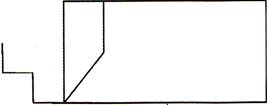
? FD 100 RT 90 FD 100 RT 90 FD 100 RT 90 FD 100
Square
? FD 100 RT 90 FD 100 RT 90 FD 100 RT 90 FD 100

 Which of the following figures will be formed when the given command is typed at the LOGO prompt?
? FD 500 RT 90 FD 50 RT 90 FD 50 RT 90 FD 50
(A) Circle
(B) Triangle
(C) Square
(D) Oval
(E) None of these
Answer: (C)
Explanation
Correct option:
(C) Square: The instructions given to the turtle in LOGO
? FD 500 RT 90 FD 50 RT 90 FD 50 RT 90 FD 50 <Enter>
will form a square.
Incorrect Options:
(A) Circle: This option is incorrect
(B) Triangle: This option is incorrect
(D) Oval: This option is incorrect
(E) None of these: This option is invalid
Which of the following commands is/are used to move the turtle towards the right?
(A) FD
(B) RT
(C) LT
(D) HT
(E) None of these
Answer: (b)
Explanation
Correct option:
(B) RT : Is used to move the turtle towards the right.
Incorrect Options:
(A) FD : This command is used to move forward
(C) LT : This command is used to move to the left
(D) HT: This command is used to hide the turtle
(E) None of these: This is an invalid option
Which of the following figures will be formed when the given command is typed at the LOGO prompt?
? FD 500 RT 90 FD 50 RT 90 FD 50 RT 90 FD 50
(A) Circle
(B) Triangle
(C) Square
(D) Oval
(E) None of these
Answer: (C)
Explanation
Correct option:
(C) Square: The instructions given to the turtle in LOGO
? FD 500 RT 90 FD 50 RT 90 FD 50 RT 90 FD 50 <Enter>
will form a square.
Incorrect Options:
(A) Circle: This option is incorrect
(B) Triangle: This option is incorrect
(D) Oval: This option is incorrect
(E) None of these: This option is invalid
Which of the following commands is/are used to move the turtle towards the right?
(A) FD
(B) RT
(C) LT
(D) HT
(E) None of these
Answer: (b)
Explanation
Correct option:
(B) RT : Is used to move the turtle towards the right.
Incorrect Options:
(A) FD : This command is used to move forward
(C) LT : This command is used to move to the left
(D) HT: This command is used to hide the turtle
(E) None of these: This is an invalid option 
You need to login to perform this action.
You will be redirected in
3 sec